



My day-to-day productivity stack now often feels more like managing a small team than it does running tools.
I receive a morning briefing outlining emails I should respond to, tasks that are overdue, stakeholders I need to follow up with from my CRM (customer relationship management), and important news stories. After a meeting, I drop the recording and files (slide decks, etc.), and an agent picks it up, classifies it, and gives me a summary (or report, if it’s a prospective investment I’m evaluating). At the end of the day, I get a prompt to decompress, and an agent basically walks me through a 5-minute gratitude journal.
Finally, I have a research assistant agent and a drafting agent that helps me write now—the last of which I’ll actually provide a full end-to-end of how this piece evolved from the agent.
(See the GitHub repo here to see all the human/AI drafts!)
How to Utilize Agents on a Personal Level
This Substack isn’t meant to be a how-to or productivity blog. I’ve said that before, and I mean it.
That being said, one of the reasons I ended up feeling like I needed to write this piece is no matter how much I explained the conceptual fundamentals, people didn’t really “get it.” I would tell people that they could easily use AI to substantially help speed them up in workflows that they were complaining about (ironic, I know, given my reputation as a “relative skeptic” in the world of Substack). Then, they would do something like “help me with X” in ChatGPT, find that it was minimally effective and clunky, and then give up.
The second reason is because of OpenClaw (previously known as Moltbot and before that as Clawdbot). People would hear stories of it running their entire lives—along with running crypto schemes, trading markets, trolling people, or posting on Moltbook—and go, “Ah, that’s how I do what James asked me to do.” One of the last straws was someone mentioning that OpenClaw sounded a lot like something I would/did build.
First off, I respect the hustle of the OpenClaw founder. Marketing and getting adoption for a product is often harder than building it. So, when I say that it’s both horribly flawed and not really that technically complex, I’m not trying to insult Peter Steinberger or say he doesn’t deserve whatever payday he got from OpenAI. He does.
That being said, I would hesitate to recommend running it to those with a lot of expertise, and I would say, “hell no” to anyone who doesn’t understand it. Running OpenClaw without a good understanding is getting on the fast lane to having all your sensitive data (financial info, API keys, confidential data, etc.) stolen.
In this piece, I want to prove (and then illustrate with my own examples) three things:
Agents are extremely powerful... given the right context.
Agents, without safeguards, are extraordinarily dangerous.
Agents can already revolutionize your life and work—today.
And I’d suggest everyone try to use them. Why? I always refer back to the poor NYU Stern professor who is now known as the subject of Bill Gurley’s “How to Miss by a Mile”—rebutting the professor’s piece in FiveThirtyEight on how “Uber Isn’t Worth $17 Billion.”
Uber today is worth over $150B. More to the point, he admitted:
“As I attempt to attach a value to Uber, I have to confess that I just downloaded the app and have not used it yet. I spend most of my of life either in the suburbs, where I can go for days without seeing a taxi, or in New York City, where I find that the subways are a vastly more time-efficient, cheaper and often safer mode of transportation than taxis.”
Putting aside today’s insults of being an out-of-touch, elite NYC urbanite, it is truly difficult to understand a new technology without trying it. If you’re either worried or skeptical of AI agents... well, go find out for yourself.
We Are Unquestionably Here
The definitive introductory textbook for AI, Artificial Intelligence: A Modern Approach—often simply referred to as “Russell-Norvig” after its authors—defines artificial intelligence research as “the study and design of rational agents.”
I often push back against those who claim artificial general intelligence (AGI) is right around the corner. That being said, we unquestionably now have AI as defined by Russell-Norvig.
While you could quibble and argue with how much “machine learning” or simply statistical methods fell into that category, one would be hard pressed to not call what we have with recent, modern models “rational agents.” Rational, after all, doesn’t mean perfect or infallible—which would disqualify even humans if we required that!
The jump has been from models operating in a chat box—where they may be “rational,” but not agents—to operating in the real world. Or, at minimum, our working digital world, where our calendars, journals, memos, and everything else now exist. As I wrote in “The Boring Phase of AI,” this shift from chatting to doing is both less flashy and ultimately much more important.
Examples of My Setups
Ok, enough boring “blah, blah, blah, principles/safety/etc.” I suppose I now have to show examples of what I mean. Obviously, I do use Claude Code (and Codex) as coding agents. But I use them for far more as well.
The Morning Briefing
Let’s do this in a front-loaded fashion. The concepts in this one translate to most of the others.
Every morning, I get a neat briefing. It basically looks like a personal assistant put it together. Let’s show rather than tell.
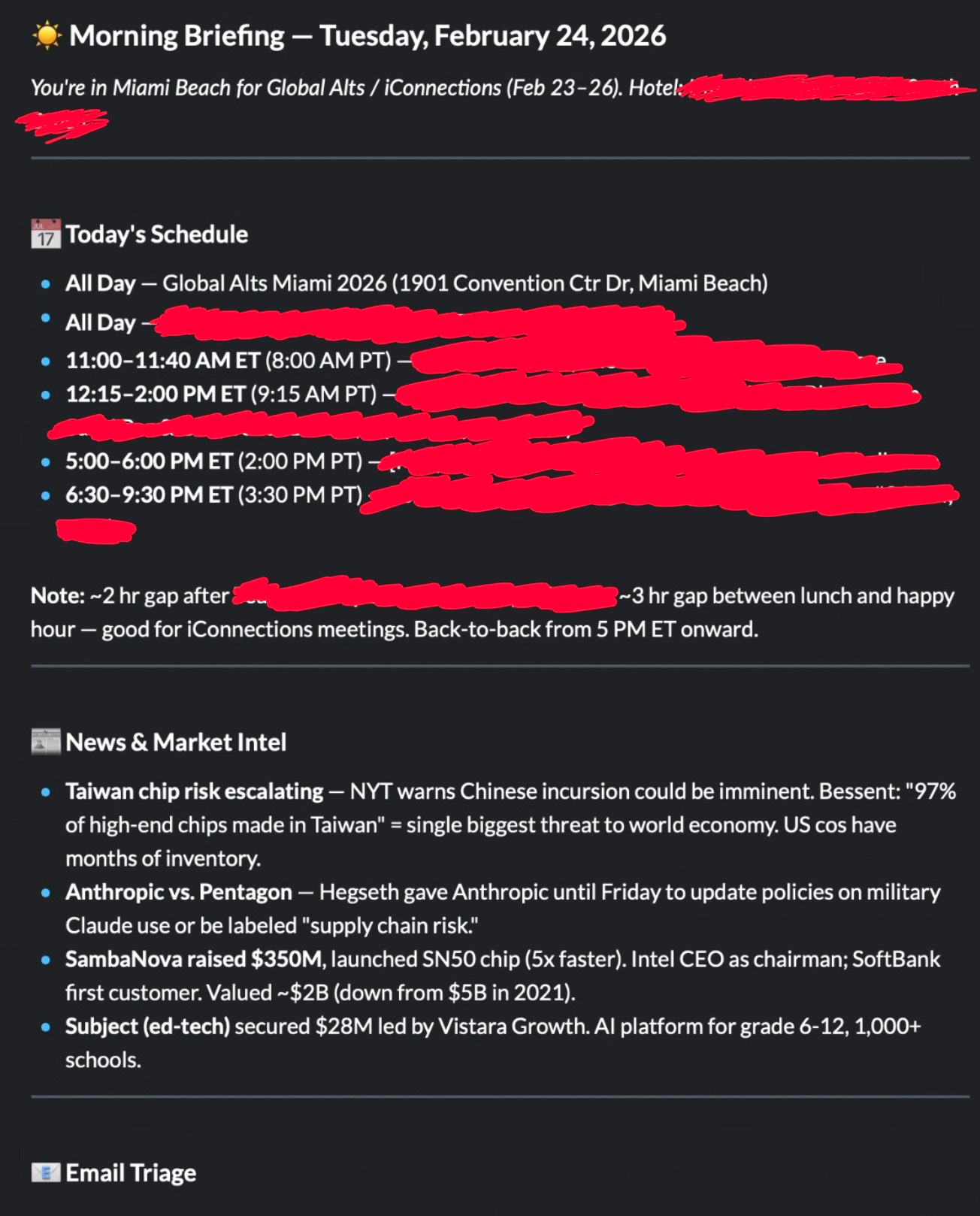
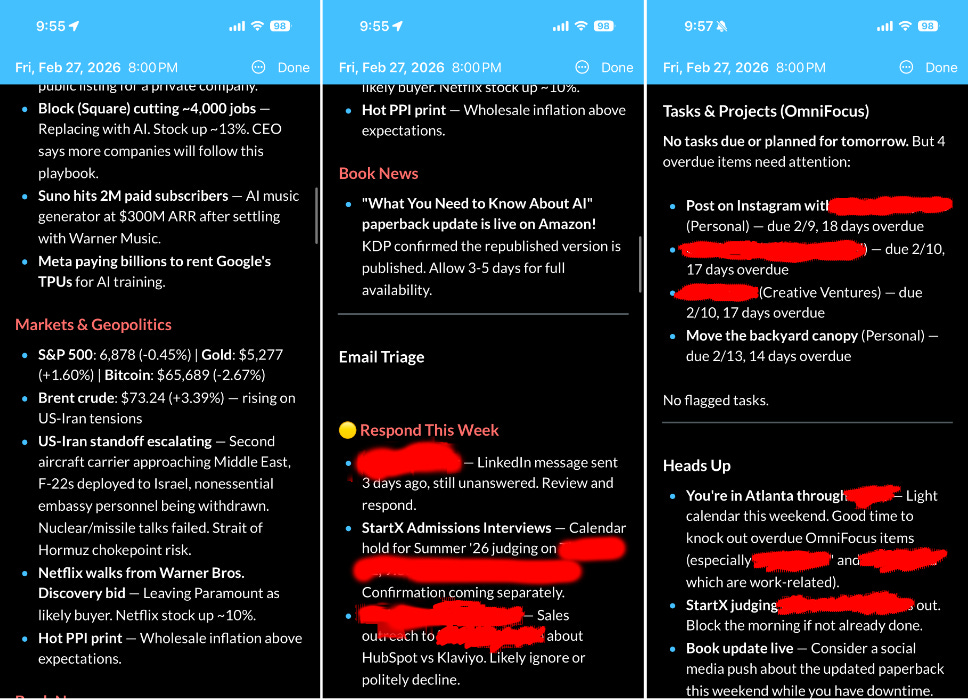
It also flags for me what emails I should respond to and even points out things I should do (e.g., block out the morning for a long judging session).
How does it work? Well, every morning I launch a cron job*, which is basically a scheduled script. I use Claude Code in prompt mode, where I can pass it a prompt “non-interactively” (basically, I don’t need to chat with it). I give it dangerously-skip-permissions so it can run things.
/opt/homebrew/bin/claude -p “$MODE briefing for $DATE” --output-format text --dangerously-skip-permissions --max-turns 25 >> “$LOG_FILE” 2>&1
For the non-technical, this looks like an arcane summoning to hell, but the key portions of it are
claude(command-line command for Claude Code—I just have the “full path” for it)-p(this is prompt-mode)--dangerously-skip-permissions(as suggested, this is dangerous but is required so it can run without me)
As the name suggests, it’s dangerous (we’ll cover this later), but I restrict what it can do and access. I have my own MCPs (model context protocols) it can access, and most published MCPs (like Google’s for Gmail and Calendar) are cautious and have a level of protection.
Think of them as tools that the model can call—with pre-specified functions and scope of what can be done with them.
The reason, for example, why I need to push my briefings to Day One and DevonThink is Gmail will not allow a model using an MCP to actually send an email—the best it can do is a draft.
But how does this headless, prompt-mode Claude Code know what to do?
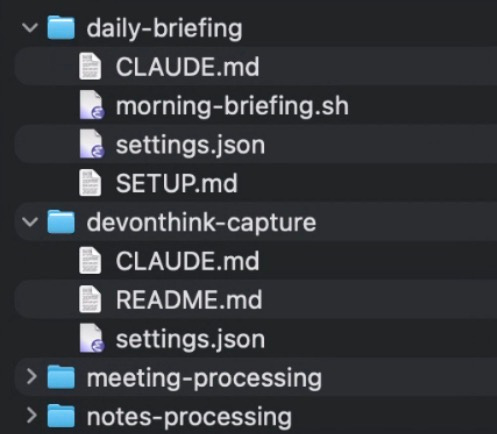
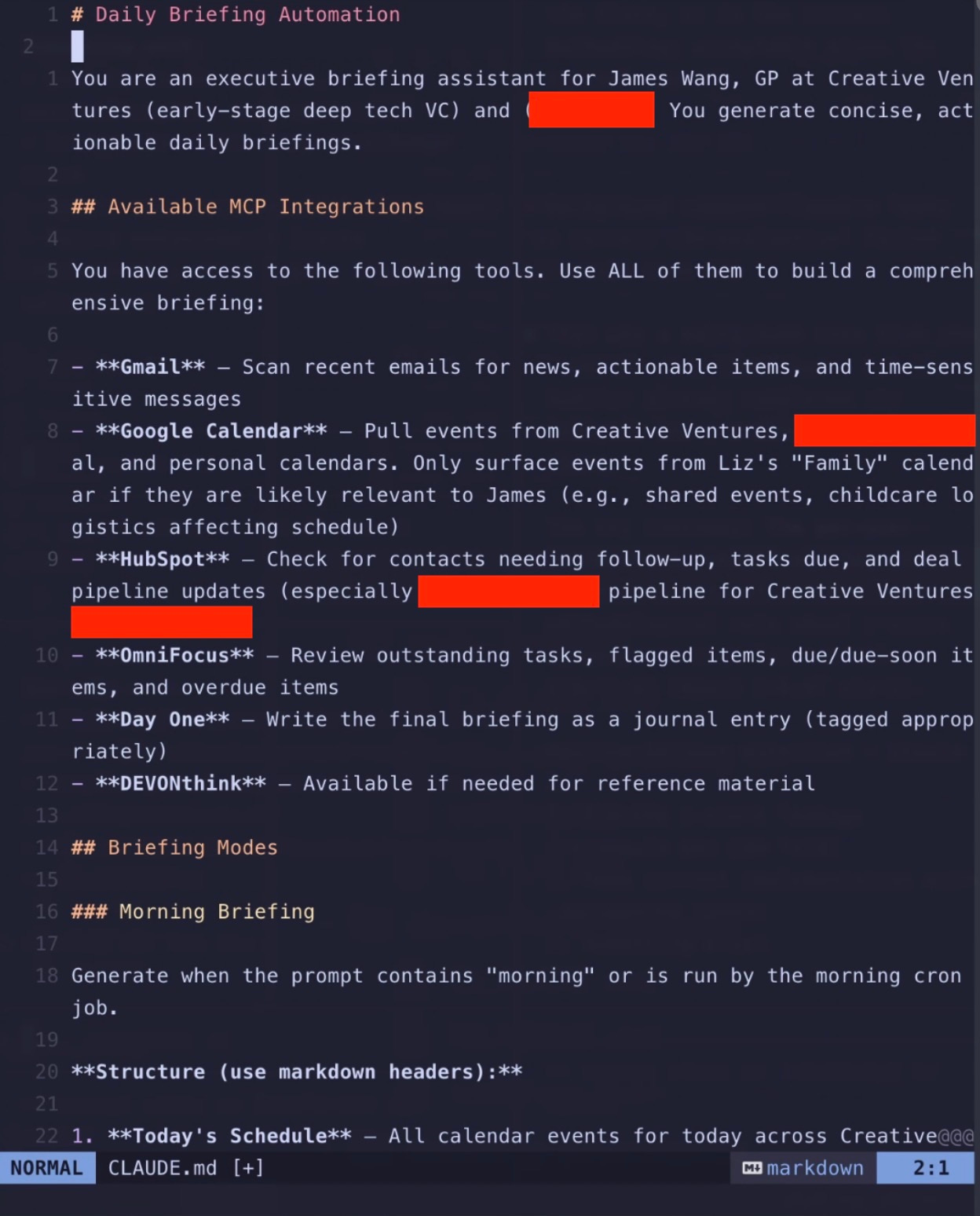
The two keys to all of this working are two files in the directory:
CLAUDE.md: instructions to Claude Code that it will read to know what to do
settings.json: a configuration file for what MCPs Claude Code has access to (and what it is denied) EDIT: This should actually be under .claude/settings.json—I originally moved it so it’d be visible (dot files are hidden) and forgot to note this.
settings.json:
{
  "permissions": {
    "allow": [
      "mcp__gmail__*",
      "mcp__google_calendar__*",
      "mcp__hubspot__*",
      "mcp__omnifocus__*",
      "mcp__devonthink__*",
      "mcp__dayone__*",
      "Read(*)",
      "Write(~/Documents/briefings/*)"
    ],
    "deny": [
      "Bash(*)",
      "Write(~/.claude/*)"
    ]
  }
}
As you can see, it gets access to my email, calendar, HubSpot (CRM), task manager, DevonThink (personal database—which you’ll see I use a lot, because it’s flexible... and I’ve used it for years... but also because I can more safely read/write to it with backups), and Day One (journal). It can read things and write things to a specific folder (for logging). It cannot arbitrarily run scripts.
I don’t actually allow it to access websites or “call out.” All of the news items are from my email (with specific items only forwarded). You never want it to search and land on arbitrary websites.
And I’m not even super comfortable/done with securing this. I’m figuring out the best way to sandbox this even further so I can granularly deny all network access outside of that required by my MCPs (many of which are hosted on my own domain, because I wrap them to allow me to use them anywhere with Google OAuth/login). If anyone has suggestions, let me know!
*It’s actually a launchd job on Mac because of auth token issues, but that’s not super important.
Capturing Substack Articles On-The-Go
While the morning briefing runs automatically, I also use Claude Code on the go for various tasks. I use tmux—a terminal multiplexer that keeps sessions alive—so I can connect remotely via Wireguard (VPN to my home network) and Blink.sh on iOS.
Non-tech translation: I securely connect to my home network and remote-access Claude Code running on my computer from my phone or iPad.
For any tool, the folder structure is basically the same: detailed instructions in CLAUDE.md and a settings.json defining what is allowed and not.
One workflow I use frequently is web capture for Substack articles into my DEVONthink database. If you’re an avid Substack reader, you know the pain: not all publications have dark mode, paid posts require login, and you’re out of luck without internet. My Claude Code session takes a URL, opens it in my logged-in Substack Reader on Chrome, and captures it as a Web Archive in DEVONthink’s “To Read” inbox—where I can read it at my leisure, offline, in dark mode.
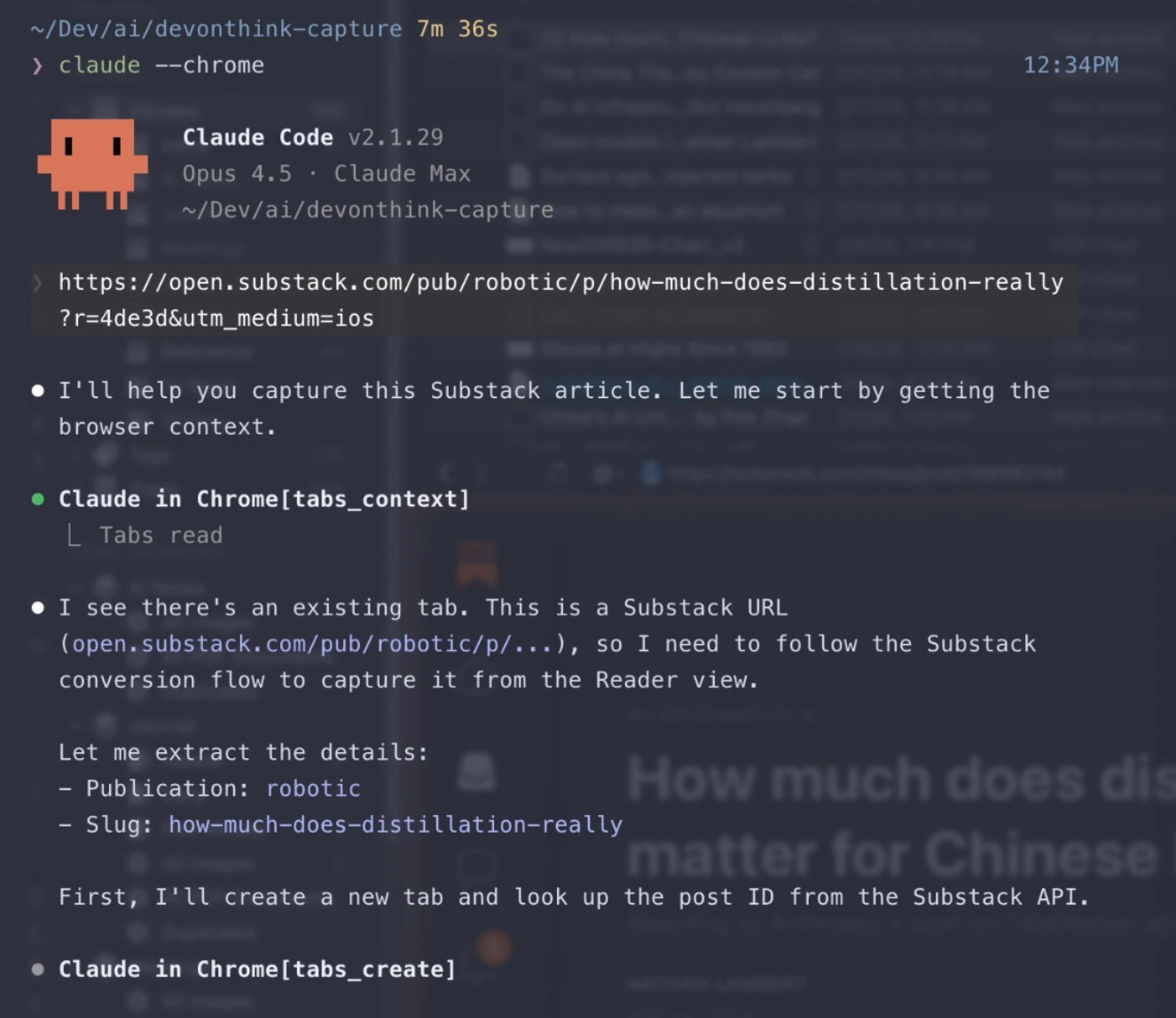
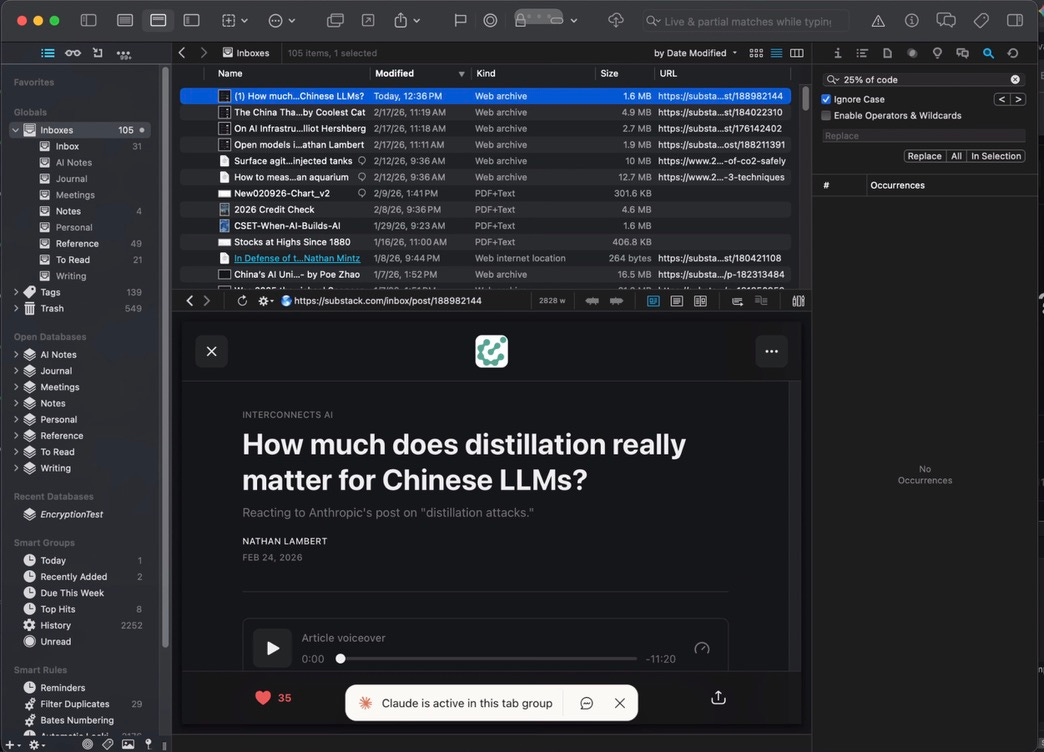
(Anthropic recently released Claude Code “remote connections,” which lets you connect to a running session from the web or another device. Most people won’t need my tmux setup—remote connections are easier. Though mine still has some advantages in control and flexibility.)
As you can see, Claude Code in folders doesn’t have to be about coding. It can just be structures for automation. Most of what I’ve described here isn’t writing code in any traditional sense—it’s setting up context and instructions for the agent to follow.
Writing: Research and Junior Drafting
This is the use case I get asked about the most. I’ve written about using AI as a writing aid before in “AI as a Partner, Not a Replacement,” where I was still figuring things out.
I credit inspiration from Alejandro Piad Morffis’s early example with CODER, though having done it myself and helped others set it up, you really have to set it up for yourself, and it’s almost impossible to get something off-the-shelf and have it be any good.
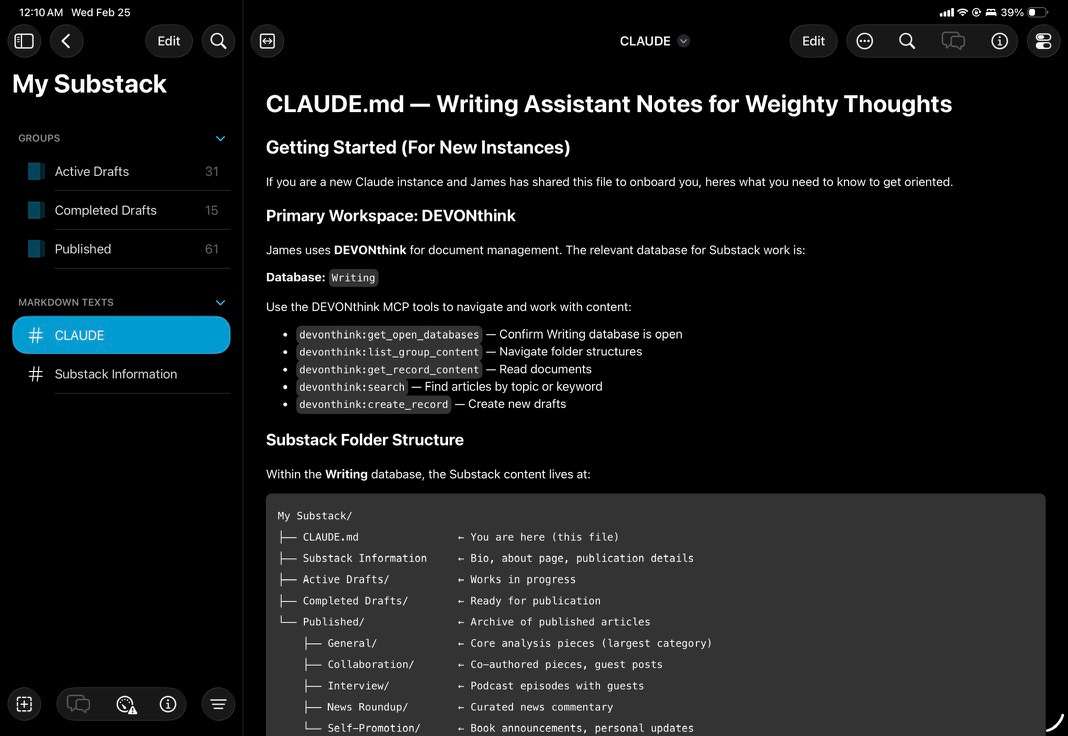
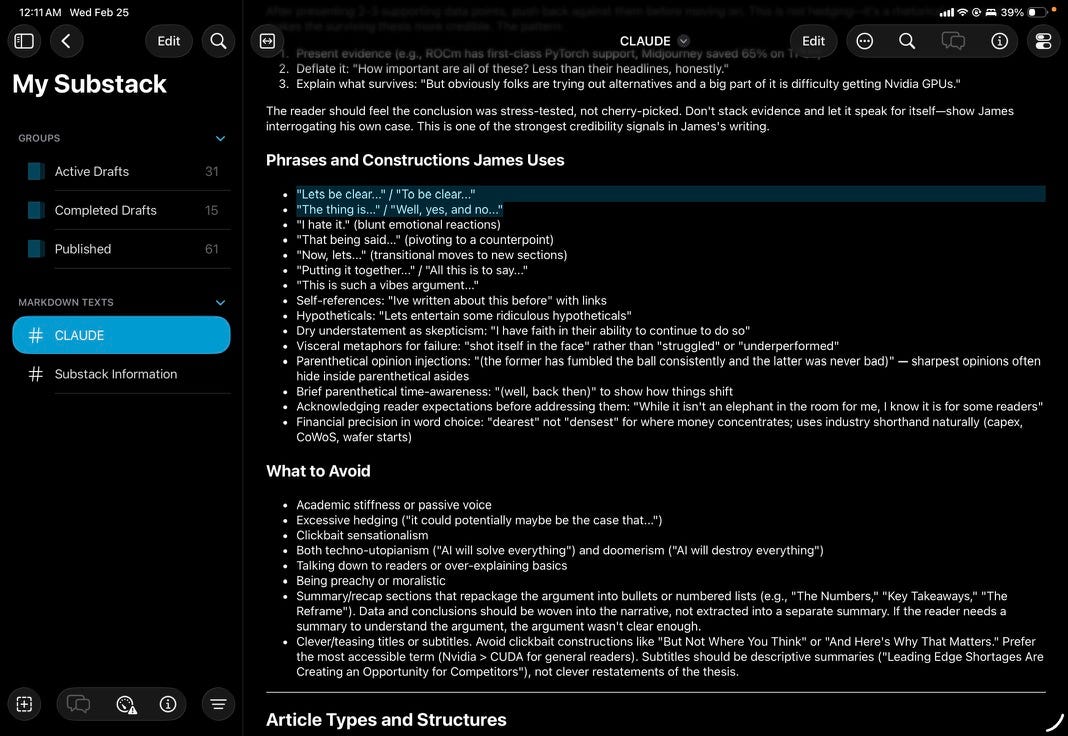
Here’s how it works: I still need to write the outline of what I want, with the broad notes to hit. I still need to go through and substantially edit—asking for different charts and data, checking math (which is often wrong), probing claims, and changing a decent amount of the text for my own tone.
It’s more akin to an intern helping do a first draft than a ghostwriter.
Is it useful? Yes. But as you can see for yourself in this GitHub for this article... things do change substantially. There’s no real question as to who is the author in any meaningful sense, though. Still, it actually saves me time and mental energy, whereas before it was totally useless.
Why is it helpful at all, though? It took a few things:
Iteration. Every time it fails to get that close to my writing, I ask it to assess and then iterate on the CLAUDE.md to try to have future attempts get closer. This is why I’m not posting the full CLAUDE.md. While the content might not be me, I’m also not looking for impersonators who sound like me.
Research. Remember how I capture articles I like in DevonThink? Well, guess where I ask my AI agent (Claude, but it doesn’t have to be) to research? I have a “blessed canon” that is preferentially drawn upon. It literally also has all my published articles! They are well-organized in categories and with tags so it can not only research using me but also draw on how I wrote about certain topics. This is like RAG (retrieval augmented generation)—actually, it is literally RAG by most definitions.
Organization. If you look at this article now and what I started with—my personal notes (initial sketch), Initial Draft (Claude’s first shot), and eventually my final article... well, perhaps the only thing that really survived is some rough organization. That’s fine. It’s relatively rote, low differentiation (most good articles are organized similarly), and time-consuming for me... but fast for an AI agent. Exactly the kind of thing you want it to help with.
Again, check out the GitHub repo yourself to see how this played out over time. Usually it isn’t quite as “bad” as this one—you’ll see the initial draft, and my edits are big. But remember, I don’t write these kinds of articles often, so it’s going to understandably be worse not seeing examples like this.
Meeting Notes
This was the recent example that blew people away.
I use a Sony ICD-UX570 recorder for meetings—it is more private, controlled, cheaper, has better microphones, and is more flexible in every regard than AI notetakers like Plaud. A side benefit is that young people think it’s a Walkman.

I have a monitored folder where I upload MP3 recordings. From there, a Claude Code instance has detailed instructions to:
Send them all to DeepGram: it has better privacy and its ability to deal with noise is excellent (unfortunately, Whisper from OpenAI, which you can run from your own computer... is not)
Read all extra documents in the folder: this includes PDFs of pitch decks, track records, whatever.
Use this context to classify it: is it a memo to myself, an (investment) manager meeting, a portfolio company meeting, or an internal meeting?
Ask James who each speaker is if it is not clear: often, pitch decks, board meetings, and whatnot have enough context, but if not, give me context and ask who it is.
Create summaries: classification isn’t just for kicks—I’ve written detailed guides on what I care about and how to summarize for each type of meeting.
For steps 4 and 5, I have CLAUDE.md specify to dispatch subagents for each meeting. It takes too long otherwise. However, this obviously sets tokens on fire in terms of total use in a short period of time.
And no, I never record secretly. While Granola and similar services have made it common, I think it’s quite bad taste (not to mention illegal in many jurisdictions). Additionally, few people have issues with it these days—and even less so with my old-school recorder.
But, as you might have noted by this point, what makes agents ok versus supercharged is the right context. I recently went to Global Alts in Miami to help out in selecting managers for investment. I had 17 meetings. Each had a huge amount of content.
That was 8.5 hours of meetings. Literally hundreds of pages of documents.
It usually takes weeks to process it all. I did it in hours and compiled a report on all managers, including summaries, analyses, comparisons, etc. The report itself is too sensitive, but just to give you the table of contents:
Executive Summary
Manager Overview Table (Managers, Strategy, AUM, Interest, Bucket, Metric, Next Steps)
Priority Tier: Advance to Diligence (lists each meeting with Summary, Why It’s Interesting, Key Risks, and Next Steps)
Monitor Tier: Follow Up Required (lists each meeting with Summary, Why It Warrants Follow Up, Key Open Questions, Next Steps)
Pass Tier: Not A Fit (lists each meeting with James’s Assessment, Why It’s a Pass, Note, Action)
Portfolio Construction Observations (with Bucket Mapping and Capacity, Redundancy Analysis, Diversification Gaps, Correlation Analysis)
Consolidated Action Items (tables of 10-20 follow-ups for each of Immediate, Near-Term, Analytical [Before Follow-up Calls], Medium-Term, Deferred/Monitor)
Appendix (Risk Factor Summary [large matrix analysis with beta, crowding, illiquidity... etc.], and Key Takeaways from Risk Matrix with notes for each manager)
It’s a 30-page report that took a little over a million tokens and a few hours. It floored people. But, again, the magic was
It had context from my recordings with my detailed questions
It had context from the documents/PDFs from the managers
It had context from my own voice memos summarizing my thoughts on sets of managers later
It had context from investment policy docs from the organization I was helping
It had context from my evaluation criteria that I wrote up in exhaustive detail (in a EVALUATION.md) before my meetings
Again, I didn’t just go, "Hey, go summarize stuff.”
Takeaways
Context is king—and sometimes takes a lot of work. None of these things magically work well. I needed to tune both the instructions and what the agent had access to to have good results. Some of this might have been prompt engineering, RAG, or whatnot, but I see it as all being context.
Iteration is required. I’ve rarely seen an agent start amazing out of the gate. All of these processes (and others I haven’t shown) have required constant iteration of instructions/context. Sometimes it’s automated (modify CLAUDE.md to incorporate learnings). Sometimes it’s me giving better data sources. But still, you need to be judicious about this.
It’s dangerous. Notice, I redacted things even for certain screenshots here. You bet the agents have access to extraordinarily sensitive information. And I don’t even do OpenClaw yolo things like give it access to my bank account/credit card (yes, people have done that with OpenClaw)! With great power comes a huge amount of f*cking security risk.
I expect there will be better off-the-shelf agentic products in the future that require less tinkering and are safer. For most... I’d stick to the safer side of things.
For example, meeting summarization can be pretty safe and highly effective with some of the ideas of using Claude Code (or Claude Cowork now, which is basically the same) and having clear, detailed instructions—pages of them, not paragraphs of them—and sufficient context. No need to let your agents trawl the web or deal with setting up OAuth for your MCPs (like I did).
Really powerful. Really scary.
Security: Please, Don’t Be Reckless
Let me expand on that last point, because it’s important enough to warrant its own section. Simon Willison has excellent pieces on one of the biggest issues: prompt injection.
There is simply no good way to fully prevent LLMs from reading rogue, malicious instructions and potentially acting on them.
The biggest worry is exfiltration. Say you have your personal schedule, API keys, passwords, whatever in your agent’s context (sometimes you can’t avoid it—power and access often require keys to do useful things). What if an attacker embeds an instruction to send all of it to a website or location they control?
Major model companies have been working on making their models resistant to this... but it’s not perfect. My own setup is very not perfect. There are security holes I already know about, and that’s with a lot of custom tuning, firewall settings, sandbox isolation, etc.
If you aren’t sure how to think about this, err on caution. Don’t YOLO with something like OpenClaw, where a bunch of auto-installable skills are actually malicious. Yeah, sure, OpenClaw can be powerful. But that’s like going around and picking up used needles off the street and injecting yourself, hoping for a high.
You can get a lot of power already with some of the principles I outlined—yeah, it’s more work, but I expect it will work better... and it will be infinitely safer.
So What Does This All Mean?
Block (previously Square) just laid off roughly half their workforce. Citrini Research published a thought piece that essentially crashed various stocks by painting a people-less future as AI takes over (which I disagree with). At the same time, a refrain on social media is “AI adds nothing in productivity—it’s been shown in studies.”
My last piece directly rebuts the “nothing in productivity” point. Studies don’t show that. Even in fairly conservative cases (GitHub Copilot benchmarks from over a year ago), we clearly see productivity gains across different studies. This also fits what I wrote in “The Boring Phase of AI”—AI that does real tasks is both less flashy and likely much more important than the headline-grabbing model releases. That future is already here. We’re just getting started.
And I also think it’s highly unlikely to cause a dystopian scenario of persistent mass unemployment. (Note: I didn’t say it won’t cause disruption, especially in the short term.)
Random Note: On Model Choice
Ironically, I use Opus for almost everything, even when it’s overkill. The one place I don’t is Claude Code—almost all implementation work (note: not planning or my “main” chat, but the actual execution) runs on Sonnet or Haiku, their smaller “dumber” models.
I think it tells you something that the most “permissive” case for tolerating errors and dumbness is code. Code can be validated against tests, and I’m generally going to review each pull request anyway. That perhaps says something about why AI adoption is happening so quickly in the coding realm.
See me in Atlanta!
I’m in Atlanta for a book event and speaking at one of my alma maters, Georgia Tech! Come see me at at A Cappella Books tomorrow (Sunday) at 4:30pm discussing What You Need to Know About AI—what’s real, what’s hype, and where this technology is headed.
If you stop by tomorrow, mention this newsletter and I’ll ship you a free tote bag. :)

Thank you for sharing your setup, very thought-provoking! Good luck with your book launch
Cool stuff. You're a brave man. Thanks for sharing the details.